How to Fill Out Spotify's New AI Disclosure Field Without Getting Flagged
August 9, 2026 · 8 min read
The short version
The disclosure field isn't just a yes/no checkbox. Most distributors now ask you to describe where AI was involved — vocals, instrumentation, lyrics, mixing. Vague or contradictory answers are what gets a track flagged for review, not the fact that AI was used.
Getting flagged usually means a mismatch, not a violation. If your disclosure says 'no AI vocals' but the track is clearly synthesized vocals in a genre known for that, the system notices the gap. Accuracy protects you more than omission does.
You need to know your own song's DNA to describe it right. Genre, subgenre, and which instruments are actually present in the mix — that's the descriptive half of the disclosure, and it's easy to get wrong from memory alone.
One analysis gives you the facts in about a minute. Songbrain scans your uploaded track and returns its detected genre, subgenre, and instrument list — the exact vocabulary you need to fill the field instead of guessing.
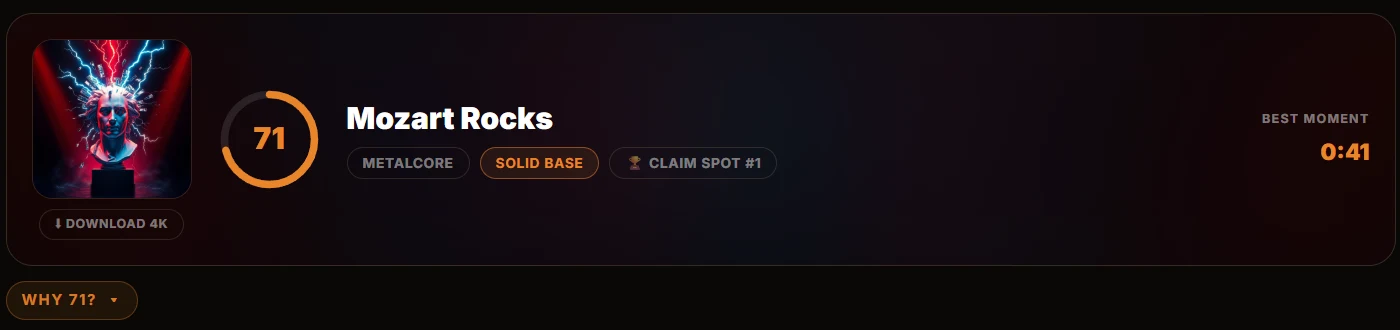
This is a real result header from a Songbrain analysis — genre, best moment, and score, all pulled from the actual audio, not typed in from memory.
Don't guess your song's genre for a compliance field.
Upload it, get the exact genre, subgenre, and instrument breakdown in about a minute — free, no account needed.
Analyze My Song FreeFree · no account · no card
What the AI disclosure field is actually asking
Spotify (and most distributors feeding it) has rolled out a disclosure step during upload that asks creators to state where AI tools were involved in making a track: vocals, instrumental parts, lyrics, or post-production. The exact wording and options differ by distributor — DistroKid, TuneCore, and CD Baby each present their own version of the form — so always read the live field in front of you rather than assuming it matches what you read here.
What's consistent across all of them: you're not just ticking "AI: yes/no." You're usually asked to be specific about which parts were AI-assisted and, often, to confirm that the credits and description elsewhere on the release match what you declare here. That last part — consistency — is where most flags happen.
Why songs actually get flagged
A flag rarely happens because a creator admitted to using AI. It happens when the disclosure contradicts something else about the release: the genre tag you picked doesn't match what the track sounds like, the instrumentation you claimed doesn't match what's audibly in the mix, or the disclosure field and the press-release text tell two different stories.
In other words: the risk isn't honesty about AI use. The risk is guessingat the descriptive details — genre, subgenre, instruments — and getting them wrong in a way that doesn't line up with the actual audio.
Step 1: Get the objective facts about your track
Before you touch the disclosure form, run your finished track through Songbrain's free analysis. One upload returns, in about a minute:
- Detected genre and subgenre (out of 37 subgenres across 9 main genres)
- Instrument detection, including world instruments
- Song DNA: tempo, key, energy, and mood
This is the part of the disclosure most creators fill in from memory or gut feeling. Genre labels drift — a track made with an AI vocal on top of a trap beat might feel like "hyperpop" to you but read as straight trap to a detection model, which is closer to how a listener or a distributor's automated review will read it too.
Step 2: Compare the facts to what you know you used
You already know which parts of the song involved AI — the tool doesn't need to tell you that. What it does is confirm the parts you might misjudge:
- Instruments:if the detection lists an instrument you didn't consciously add (common with AI-generated instrumentals), you now know it's audibly present and should be reflected in your description.
- Genre/subgenre: use the detected label, not the label you had in your head when you started the session. Distributors compare your metadata against the audio; a mismatch here is an easy, avoidable flag.
- Mood and energy: useful if the disclosure form or your release notes ask for a description beyond genre — you get a factual basis instead of adjectives you made up.
Step 3: Fill the field with specifics, not vague hedging
Whatever the exact form looks like, specificity reads as confidence and confidence reads as honesty. Compare:
Vague: "Some AI was used in this song."
Specific: "Vocals generated with an AI tool; instrumentation is [detected genre/subgenre], human-produced with [detected instruments]."
The specific version is faster to review and less likely to trigger a manual check — because it gives the reviewer (human or automated) nothing to cross-check that doesn't already match.
One thing Songbrain does not do
To be clear: Songbrain does not detect whether audio itself was AI-generated, and it does not submit anything to Spotify or any distributor on your behalf. It analyzes the finished audio and hands you the genre, subgenre, and instrument facts. The disclosure decision — what was AI-made and what wasn't — is still yours to state, because you're the only one who actually knows how the track was built.
If you made the track with Suno or a similar tool
If your starting point was an AI music generator, the disclosure is simpler in one way — you already know the honest answer is "yes, AI was used." The part worth double-checking is still the genre and instrumentation, since generator output often lands in a different subgenre than the prompt suggested. See how to release a Suno song on Spotify and how to market a Suno song for the full release path once the disclosure step is done.
And once the release itself is live, the actual growth work starts — see how to turn your song into reels for what to post next.
Fill the disclosure field with facts, not guesses.
Upload your track, get genre, subgenre, and instrument detection in about a minute.
Free · no account · no card