Suno Cuts Free Downloads to 7 a Month on September 3 — Here's Your Escape Plan
August 17, 2026 · 8 min read
The short version
Suno's free download cap drops to 7 songs a month on September 3, 2026. If you've been making music on a free account, that's the new ceiling for pulling your own files.
You can still download everything you've made — but only for a few more weeks. Every song sitting in your Suno library right now is downloadable today. After the cutoff, most of it isn't, unless you upgrade.
One album upload can process 20 of those tracks at once. Songbrain's album engine scores, ranks, and packages up to 20 tracks in a single run — so backing up your catalog doesn't mean 20 separate uploads.
That same upload can turn into up to 74 ready-to-post videos. 4 album videos plus up to 7 reels per track from a 10-track album — so the backup doubles as a marketing plan.
Suno confirmed the change last week: starting September 3, 2026, free accounts are limited to 7 downloads a month. If you've spent the last year generating songs on a free account — dozens of tracks, maybe a full unreleased album — that limit hits you retroactively. Everything already sitting in your library is still yours today. In three weeks, pulling more than 7 files a month means paying for it or waiting.
The smart move isn't panic-downloading a folder of WAV files you'll never open again. It's using the next few weeks to actually turn that catalog into something useful — before the door narrows. That's what this guide walks through.
Step 1: Get everything out of Suno now
Before anything else, download every track you care about while the limit is still open. Don't sort or judge yet — just get the audio files onto your own drive. You can decide what's worth releasing later. What you can't do later is redownload a song that's stuck behind a monthly cap.
Step 2: Upload the whole batch as an album
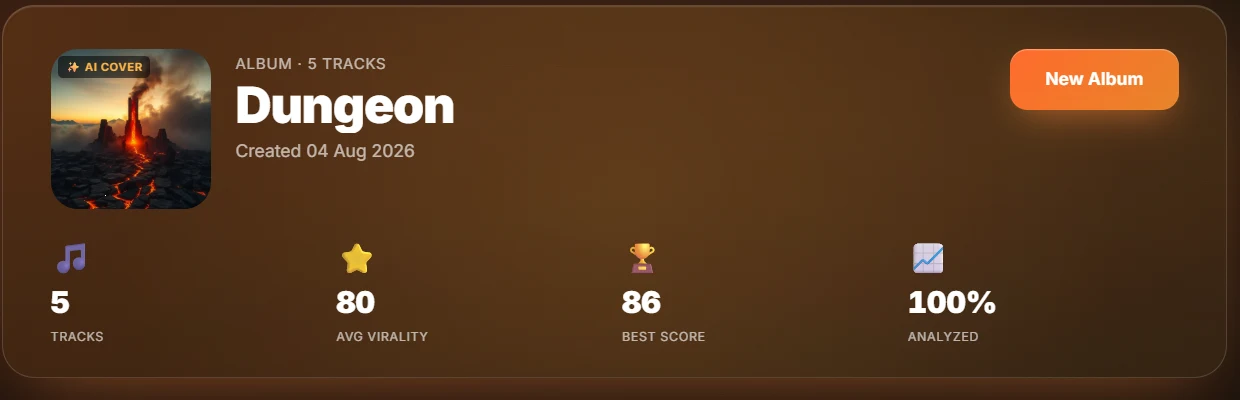
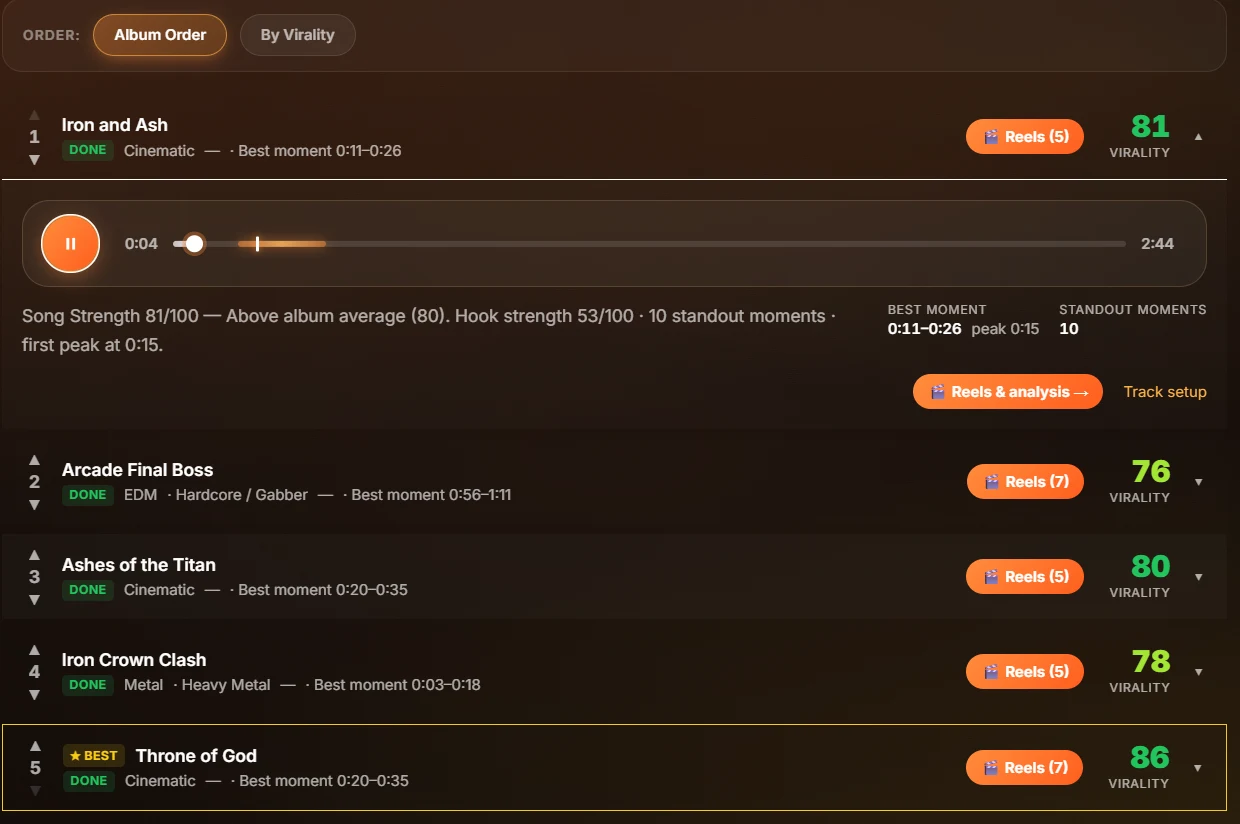
Once the files are safe, the next question is usually: which of these 15, 20, 30 songs are actually worth building around? That's exactly what an album upload answers in one pass. Songbrain's album engine takes up to 20 tracks at once, scores every one with the same model, and ranks them — with the strongest track flagged with a ★ BEST badge as the lead-single recommendation.
This is a real 5-track album analysis, not a mockup — the same view you get after an upload.
Don't let a download cap decide what happens to your catalog.
Upload one track free and see the score, best moment, and cover art in about a minute.
Try Songbrain freeFree · no account · no card
Step 3: Let the ranking decide the order
If you've got 20 unreleased Suno songs, you probably don't know which one should open the project. Songbrain's tracklist has a toggle between your original artist order and the AI's By Virality order — so you can compare gut feeling against the actual hook data before you commit to a release sequence. Our guide on album track order goes deeper on why sequencing matters as much as the songs themselves.
Step 4: Walk away with a full release kit, not just backups
The point of doing this now, before the cutoff, is that the same upload that saves your catalog also builds your marketing for it. Every analyzed track gets 7 ready-to-post 9:16 reels cut to its best moments, with captions and hashtags per platform. Songbrain also now generates a 16:9 cut for YouTube from the same analysis, so the same upload covers TikTok, Reels, Shorts, and YouTube without extra editing. On top of that, an album upload unlocks 4 exclusive album videos— Cover Reveal, Album Teaser, a "Which One Goes Hardest?" comment poll, and Out Now.
Do the math on a 10-track batch: 4 album videos plus up to 7 reels per track is up to 74 ready-to-post videos from songs that were about to get locked behind a download limit. If you want the step-by-step on the upload itself, see how to upload an album for AI analysis, and for what to do with the videos once they exist, check the album release reel strategy.
Step 5: Give the songs a real cover, not a placeholder
Songs generated on Suno rarely come with real artwork. Every song Songbrain analyzes gets its own AI cover art built from that song's DNA— genre, mood, energy — not a generic template, and albums get a matching cover across the set. If you plan to actually release any of these tracks, that's the difference between a folder of files and something that looks like a project. If you haven't decided where these songs land yet, our guide on marketing a Suno song is the natural next stop.
What this actually costs
One analysis is 25 credits. On Freeyour first song costs nothing and signup adds 25 credits — enough for one more analysis, with 720p downloads carrying a small Songbrain mark. If you're processing a real back catalog, Premium at $19/month (or $180/year) gives you 1,000 credits a month — 40 analyses — plus clean 1080p exports, the full album engine, and 4K covers. Either way, the free tier is enough to test the exact workflow above on one song before you decide.
The timeline that matters
You have until September 3, 2026before Suno's free download limit drops to 7 a month. That's enough time to pull your files, run them through an album upload, sort the real contenders from the filler, and come out the other side with a ranked tracklist, matching covers, and a stack of reels — instead of just a folder you were rushing to save.
Turn your Suno catalog into a release before the cutoff hits.
Upload up to 20 tracks, get the ranking, the covers, and up to 74 videos — in one pass.
Free · no account · no card